Yes, you can use AI writing plugins for WordPress without becoming an API expert, but many tools require an OpenAI API key to generate content. The key determines how the AI service connects to your account and how usage is billed.
Key takeaways
- An OpenAI API key is a private credential that lets a plugin bill usage to your account.
- API access is billed separately from ChatGPT Plus and other ChatGPT plans.
- Raw text costs per post are low, but images, retries, and research add up.
- Keys need protecting: unique keys, spending limits, and server-side storage.
- Bundled-credit plugins remove key management in exchange for a subscription.
- Review your setup every quarter, because prices and features change quickly.
Many AI writing plugins ask you to paste an OpenAI API key before they write a single word. For beginners, that raises three questions: where do you get the key, what will it cost, and is there an easier route? This guide answers all three with current pricing, a cost model for a 3,500-word post, security advice, and honest alternatives. If you would rather skip keys entirely, Edysor is one option we compare below.
Table of contents
- What Is an OpenAI API Key?
- How Plugins Use the API Behind the Scenes
- Two Ways AI Writing Plugins Handle API Access
- How to Set Up an OpenAI API Key
- OpenAI API Requirements to Check First
- OpenAI API Pricing in 2026
- What Does One Blog Post Really Cost?
- API Key Cost Versus Bundled Credits
- How to Protect Your API Key
- Common Key Mistakes in Writing Plugins
- How to Use the OpenAI API Efficiently for Blogging
- OpenAI API Alternatives for AI Writing
- Which Setup Fits Your Situation?
- What to Check Before Choosing a Plugin
- Trends Shaping AI Writing Plugins in 2026
- Where Edysor Fits: SI (Super Intelligence)
- Frequently Asked Questions
- Final Thoughts
What Is an OpenAI API Key?
An OpenAI API key is a unique code that identifies your requests and lets software call OpenAI models on your behalf, with usage billed to your account. An AI writing plugin sends your prompts to the model through that key and receives the draft. Searchers often call it a ChatGPT API key, but the API and ChatGPT are separate products with separate billing.
How Plugins Use the API Behind the Scenes
A long-form post is rarely one request. A full pipeline might research topics, build an outline, write each section, generate images, and check the draft against rules. Every step sends tokens and receives tokens, so more stages mean more usage. That is why two plugins using the same model can produce very different bills. Understanding this makes OpenAI API integration decisions easier, because you can ask vendors how many calls a finished post actually needs.
Two Ways AI Writing Plugins Handle API Access
Most plugins fall into one of two models. Our comparison of the best AI blog writing plugins covers specific tools, while this table summarises the trade-offs.
| Factor | Bring your own key | Bundled credits |
|---|---|---|
| Setup | Create account, add billing, paste key | Sign up and start |
| Billing | Plugin plus provider usage | One subscription |
| Cost predictability | Varies with usage and retries | Fixed credits per month |
| Model choice | Often wide | Set by the vendor |
| Security burden | You protect the key | Vendor protects keys |
| Best for | Technical users wanting control | Teams wanting simplicity |
How to Set Up an OpenAI API Key
- Create an account on the OpenAI API platform.
- Add a payment method and a small prepaid balance.
- Set a monthly budget limit in your billing settings.
- Create a new key for this plugin only, and name it clearly.
- Paste the key into the plugin’s settings page.
- Generate one test post and check the usage dashboard.
A ChatGPT subscription does not include API access, so you will need a separate API balance even if you already pay for ChatGPT.
OpenAI API Requirements to Check First
Before you start, confirm a few basics:
- A verified API account with a payment method or prepaid balance
- A plugin version that supports the model you plan to use
- A host that allows outbound connections to the API
- A budget limit and usage alerts for each project
- A clear owner who rotates and monitors the key
Missing any of these is the usual reason a first test post fails or costs more than expected.
OpenAI API Pricing in 2026
OpenAI lists pricing per million tokens, and a token is roughly three-quarters of a word. Current standard rates for the main text models are:
| Model | Input | Cached input | Output | Positioning |
|---|---|---|---|---|
| GPT-5.6 Sol | $5.00 | $0.50 | $30.00 | Flagship, agentic work |
| GPT-5.6 Terra | $2.00 | $0.20 | $12.00 | Balanced, high-volume |
| GPT-5.6 Luna | $0.20 | $0.02 | $1.20 | Fast, affordable |
Rates are per one million tokens. OpenAI also offers Batch processing at 50% off for work that can wait up to 24 hours, which suits scheduled blog generation.
What Does One Blog Post Really Cost?
Assume a 3,500-word post uses about 12,000 input tokens and 6,000 output tokens across prompts, outline, and drafting. This is an illustrative assumption, not a measured average.
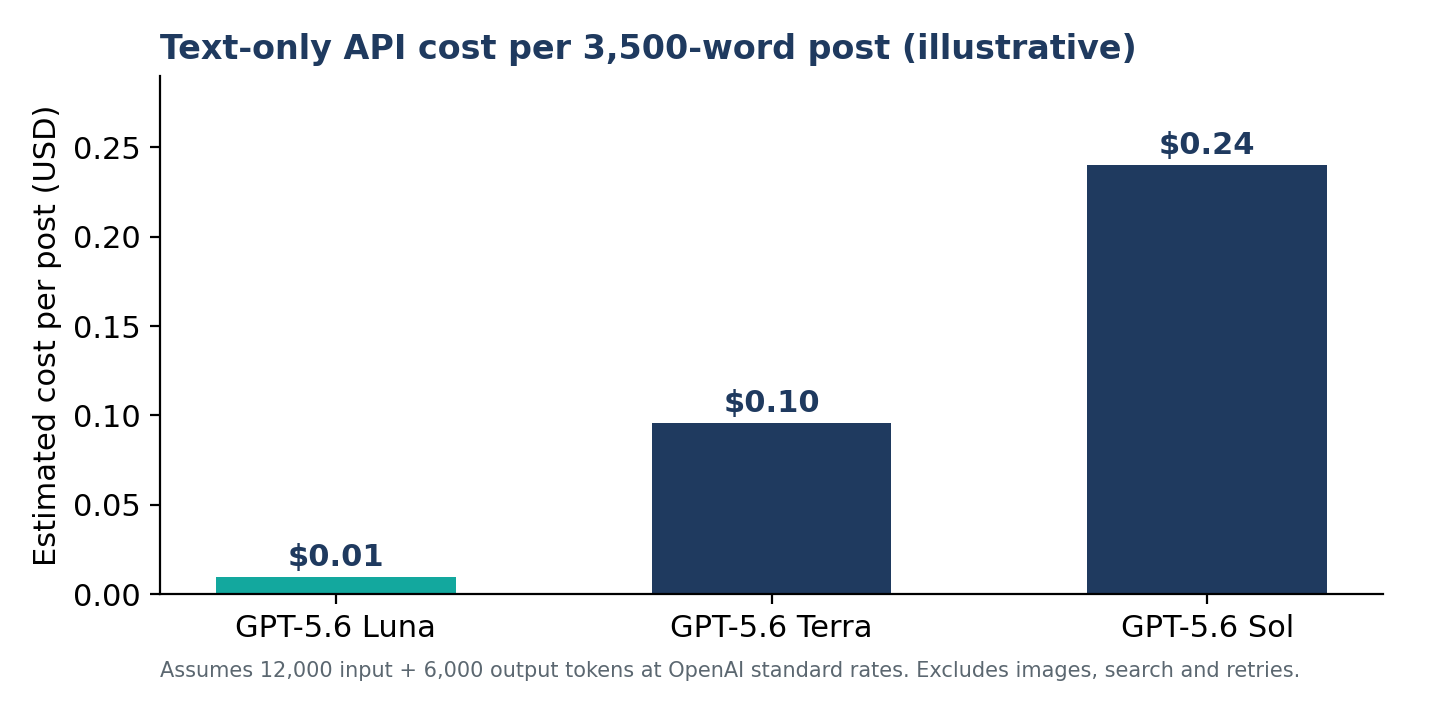
Figure 1: Estimated text-only cost per 3,500-word post, using the assumption above.
Text is cheap. The real costs sit elsewhere: image generation, web search tool calls priced at $10 per thousand, rewrites when a section comes back short, and your own time debugging settings. Our AI blog writer cost breakdown explains how those extras change per-post totals.
Scale matters too. Using the same assumption, 30 posts a month costs roughly $0.29 on Luna, $2.88 on Terra, and $7.20 on Sol for text alone. Those figures exclude images, research calls, and any rewrites, so treat them as a floor rather than a quote.
API Key Cost Versus Bundled Credits
Be realistic: token costs alone are usually lower than a bundled credit. Credits pay for the surrounding work, including research, word-budgeted outlines, images, and compliance checks. Edysor prices one credit per finished post, and the effective cost falls as plans scale.
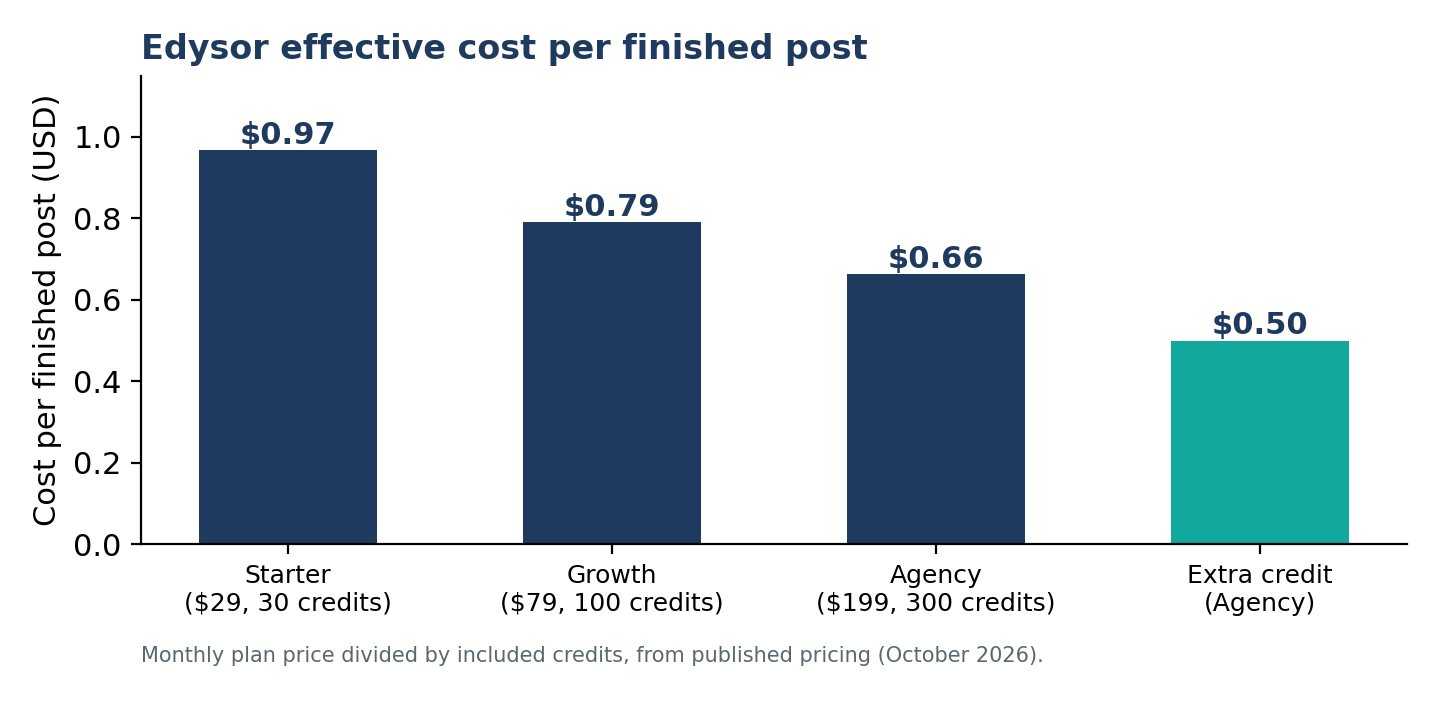
Figure 2: Effective cost per finished post on published Edysor plans.
Choose a bring-your-own-key plugin if you enjoy tuning prompts and managing accounts. Choose bundled credits if you publish for clients and need predictable invoices. Agencies in particular should read how to manage 10+ client blogs without hiring more writers.
How to Protect Your API Key
A leaked key lets strangers spend your balance. OpenAI’s key safety guidance recommends these habits:
- Use a unique key for each person and project
- Never expose keys in browsers or mobile apps
- Store keys in environment variables, not source code
- Rotate any key you suspect has leaked
- Set monthly budget limits and email alerts
Common Key Mistakes in Writing Plugins
- Sharing one key across several client sites
- Skipping budget limits during early testing
- Pasting keys into shared documents or chat
- Assuming a ChatGPT subscription covers API usage
- Never checking the usage dashboard after launch
Each mistake is cheap to avoid and expensive to discover late.
How to Use the OpenAI API Efficiently for Blogging
If you do run your own key, a few habits keep spending under control:
- Use a lighter model for outlines and a stronger one for final drafts
- Reuse long system prompts, because cached input is billed at a fraction of standard input
- Schedule non-urgent posts through Batch processing for the 50% discount
- Cap output length so one request cannot run away
- Track usage per site so client costs stay visible
OpenAI API Alternatives for AI Writing
Some plugins let you connect other providers, such as Claude, Gemini, or Mistral, using the same bring-your-own-key approach. Others bundle the model so you never see a key. A third option is writing in a chat tool and pasting drafts into WordPress, which is flexible but manual. The table compares them.
| Option | Key required? | Automation level |
|---|---|---|
| OpenAI key in a plugin | Yes | Depends on plugin |
| Other provider key in a plugin | Yes | Depends on plugin |
| Bundled-engine plugin | No | Full pipeline |
| Chat tool plus manual paste | No | Manual |
Which Setup Fits Your Situation?
| Your situation | Suggested route |
|---|---|
| Developer who enjoys tuning prompts | Bring your own key |
| Solo blogger posting weekly | Either route, based on time |
| Agency managing many client blogs | Bundled credits with profiles |
| Regulated niche such as CBD or finance | Plugin with enforced claim checks |
| Occasional writer on a tight budget | Chat tool and manual paste |
No route is universally best. Revisit the decision every quarter, because model prices, plugin features, and your own publishing volume will change.
What to Check Before Choosing a Plugin
Whatever model sits behind the plugin, evaluate the output rules. Google’s stance targets unreviewed scaled content, as our guide to what Google’s guidance says about AI content explains. Check these points:
- Human review before publishing
- Banned-claim checks, especially in regulated niches, as covered in our AI content compliance guide
- Natural writing that avoids patterns AI detectors look for
- Long-form quality, which we examine in can AI write a 3,000-word blog post
- Whether it automates the workflow, a distinction explained in AI content generator vs. automation
Trends Shaping AI Writing Plugins in 2026
Three shifts stand out. First, buyers are moving from single prompts to automated pipelines that research, write, and publish. Second, pricing is moving toward predictable per-post units, because token bills confuse non-technical teams. Third, review and compliance are becoming selling points rather than afterthoughts, as search engines and regulators scrutinise unreviewed automation. Expect plugins to compete on workflow quality, not just model access.
Where Edysor Fits: SI (Super Intelligence)
Edysor is a WordPress plugin that researches, writes, illustrates, and publishes 3,000 to 4,000 word posts. It runs on SI (Super Intelligence) using Edysor’s own keys, so there is no OpenAI account to open and no token bill to monitor. Every post lands as a draft for human review, and auto-publish ships switched off. Plans start at $29 per month for 30 credits, and one credit covers one finished post with two images.
Skip the API Key Setup
Request early access to Edysor and publish reviewed long-form posts.
Frequently Asked Questions
Do I need an OpenAI API key for every AI writing plugin?
No. Bring-your-own-key plugins require one, while bundled-credit plugins such as Edysor run on the vendor’s keys.
Does ChatGPT Plus include API access?
No. OpenAI bills the API separately from ChatGPT Plus, Business, Enterprise, and Edu plans, so you need an API balance.
How much does an OpenAI API key cost?
The key itself is free. You pay for usage per token, and costs depend on the model, post length, images, and retries.
Is it safe to paste my API key into a plugin?
It can be, if you use a dedicated key, set budget limits, and trust the plugin’s storage. Rotate the key if anything looks suspicious, and never share one key across clients or colleagues.
What are the best OpenAI API alternatives?
Other providers through bring-your-own-key plugins, or bundled-engine plugins that need no key. The right choice depends on control versus convenience, and on how much key management your team wants to handle.
Final Thoughts
An OpenAI API key gives you control, but also responsibility for billing, security, and quality. Decide how much of that you want to own, then pick the plugin model that matches your team and your publishing volume. Whichever route you choose, keep humans in the review loop, because the model writes the draft and you answer for what gets published. Start this week with one test post, one budget limit, and one clear calendar review date.
Ready to compare? See Edysor pricing and find the plan that fits your publishing schedule.