AI writing plugins are WordPress add-ons that use a large language model (LLM) to draft, rewrite and optimize content inside your editor. In 2026, most run on one of two models: you bring your own API key and pay the AI provider directly, or you pay a subscription that bundles usage. That choice decides your real cost, your data control and your workload. This guide covers API keys, honest cost ranges, benefits, risks and trends, and links to our deeper research, including the best AI blog writing plugins for WordPress in 2026.
Table of contents
- What Are AI Writing Plugins and How Do They Work?
- Do AI Writing Plugins Require API Keys?
- How to Keep Your API Keys Secure
- Popular AI Writing Plugins Compared
- What Do AI Writing Plugins Cost in 2026?
- Benefits of AI Writing Plugins
- Risks: Accuracy, Detection and Google
- Making AI Drafts Meet EEAT
- A Practical Draft-to-Publish Workflow
- AI Writing Plugin Trends to Watch in 2026
- How to Choose the Right AI Writing Plugin
- Frequently Asked Questions
Key takeaways
- Most plugins need an API key unless usage is bundled into the subscription.
- Raw API usage often costs cents per post; bundled plans cost more but remove setup.
- Google evaluates helpfulness, not how a draft was produced.
- Human review turns an AI draft into EEAT-ready content.
- Trends favor multi-provider, source-grounded, draft-only tools.
What Are AI Writing Plugins and How Do They Work?
An AI writing plugin connects WordPress to an LLM through an API. You enter a keyword or brief, the plugin sends a structured prompt, and the model returns a draft you refine in Gutenberg or the Classic Editor. Features vary: some generate full posts, others rewrite paragraphs, create meta descriptions or run scheduled bulk campaigns. WP Wand supports models from OpenAI, Anthropic, OpenRouter and DeepSeek, while AI Content Writer offers bulk title import. The plugin supplies the workflow; the model supplies the language.
Most tools fall into three types:
- Editor assistants: rewrite, expand or summarize text you select.
- Full-post generators: turn a title or keyword into a structured draft.
- Auto-bloggers: schedule and publish posts from keyword lists or RSS feeds, which demands the strictest review.
Do AI Writing Plugins Require API Keys?
Often, yes. An API key is a private credential that lets a plugin call a model on your behalf, and the provider bills you per token processed. Plugins fall into three groups.
Table 1: How AI writing plugin pricing models compare
| Model | How it works | Typical cost | Best for |
|---|---|---|---|
| Bring your own key (BYOK) | Paste a provider key; the provider bills usage | Free or low plugin fee, plus cents per post | High volume, technical teams |
| Bundled credits | Subscription includes AI usage | About $2 per post on one published $99 plan for 50 posts | Beginners, small teams |
| Hybrid | Free tier plus optional own key | Varies by provider | Testing before scaling |
BYOK offers model choice and no markup. Dicecodes AI Blog Writer and AI Blog Writer with Sources let you connect OpenAI, Claude, Gemini or Grok keys and pay providers directly. The trade-off is setup: you manage prompts, spending limits and key security. Store keys in server-side settings, set usage caps in your provider dashboard, and never paste keys into shared documents.
Choose BYOK if you publish often, want to switch models freely and can monitor spending. Choose bundled credits if you want predictable invoices and minimal setup. Agencies often start bundled, then move high-volume clients to their own keys once processes stabilize.
How to Keep Your API Keys Secure
A leaked key can run up bills quickly, so treat it like a password:
- Create a separate key for each site, so you can revoke one without breaking others.
- Set monthly spending caps and email alerts in the provider dashboard.
- Restrict permissions wherever the provider allows it.
- Rotate keys every few months, and immediately after staff changes.
- Keep keys out of themes, public repositories and chat messages.
Popular AI Writing Plugins Compared
Plugin directory listings show how differently these tools approach keys, providers and safeguards.
Table 2: Example plugins and their listed strengths (September 2026)
| Plugin | Providers listed | Standout feature |
|---|---|---|
| WP Wand | OpenAI, Claude, OpenRouter, DeepSeek | Bulk post generator; Elementor and WooCommerce support |
| AI Engine | Your own key, such as OpenAI | Flexible framework with chatbot and content tools |
| AI Content Writer | ChatGPT, Gemini | Bulk title import for campaigns |
| Dicecodes AI Blog Writer | OpenAI, Anthropic, Gemini, Groq, Ollama | Free; no subscription or credits |
| AI Blog Writer with Sources | OpenAI, Claude, Gemini, Grok | Citations; never publishes automatically |
What Do AI Writing Plugins Cost in 2026?
Three layers add up: the plugin license, AI usage and editing time. Usage is the smallest. Providers charge per million tokens, and a 1,500-word post needs only a few thousand. Mid-2026 list prices for output tokens run from roughly $1 to $25 per million, depending on model tier.
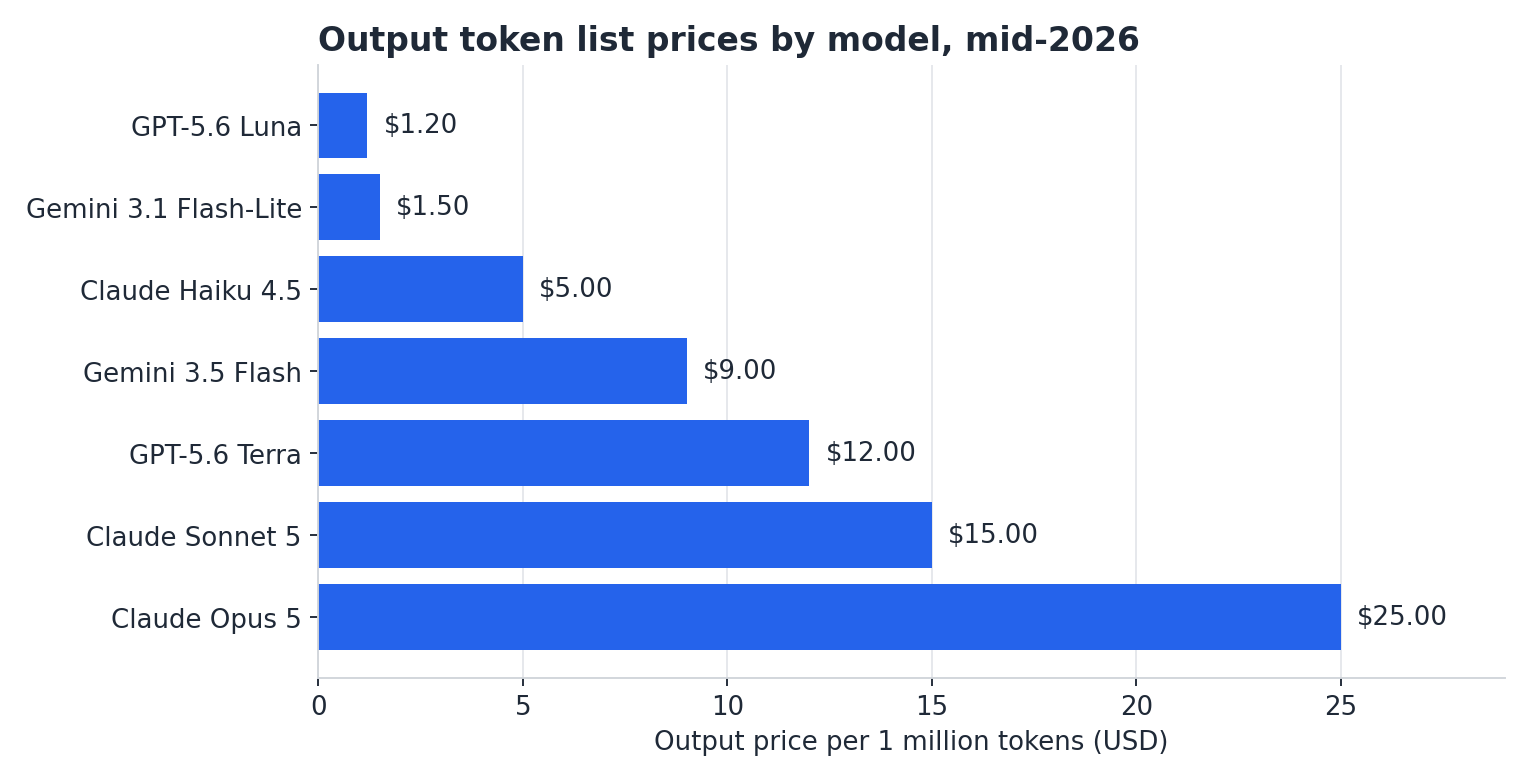
Chart 1: Output token list prices per million tokens, mid-2026. Verify on provider pages before budgeting.
As an illustrative estimate, assume a workflow that sends 12,000 input tokens and generates 6,000 output tokens per post across outline, draft and revision.
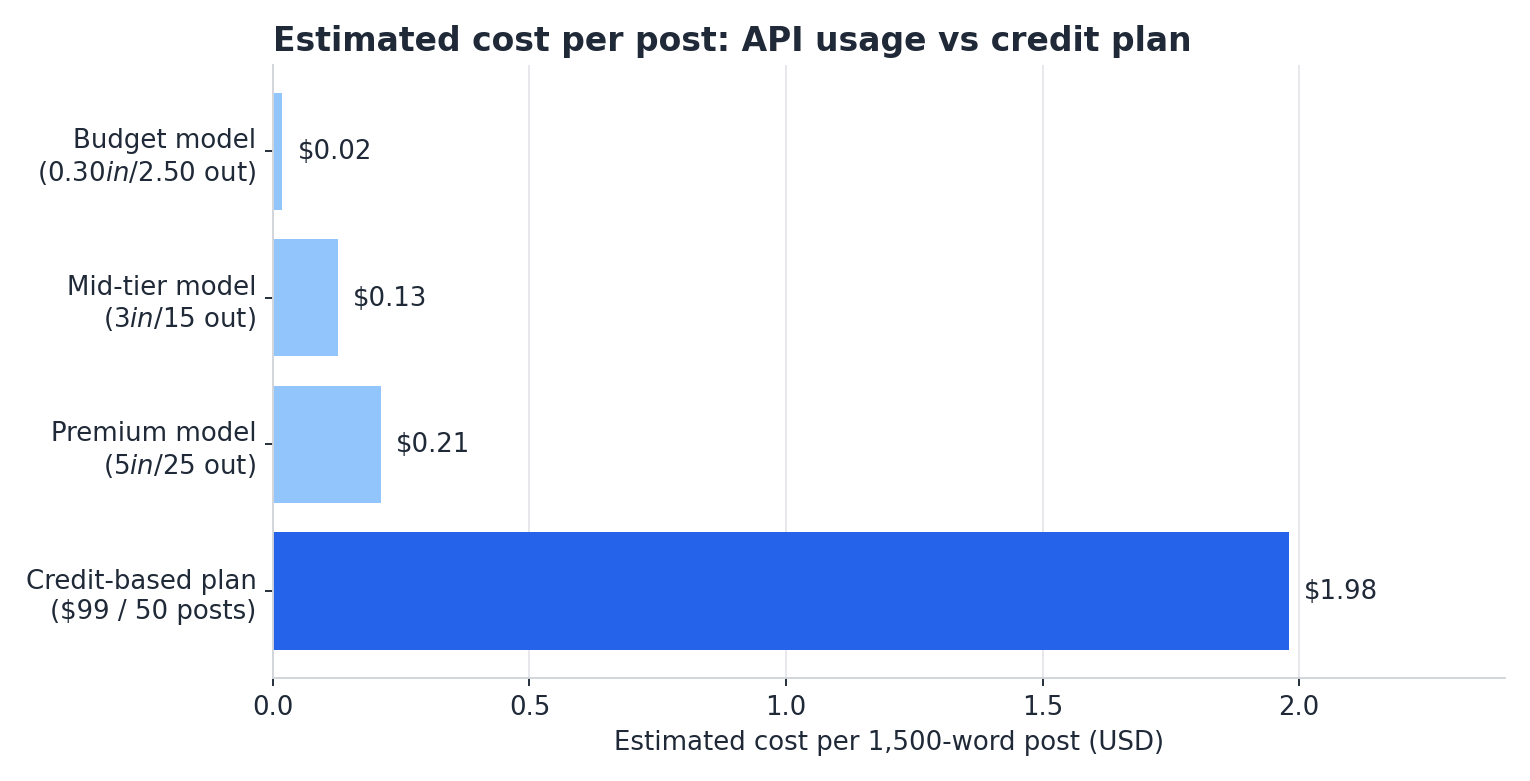
Chart 2: Estimated cost per 1,500-word post. The credit plan divides $99 by 50 posts.
A budget model costs about two cents per post, a premium model about twenty-one cents, and a credit-based plan nearly two dollars. These estimates use list prices and exclude taxes, images and editing time. The higher price buys convenience, not automatically better quality. For plan-level comparisons, read our breakdown of how much an AI blog writer costs per post. The real expense is editing: every draft still needs fact-checking, original examples and brand voice.
At 50 posts a month, that is roughly $1 to $10 in API usage versus $99 on a bundled plan, before editing time. Bundled plans can still win when they include support, images or workflow features you would otherwise build yourself.
Watch for costs that list prices hide:
- Reasoning and long prompts: thinking tokens and long-context tiers can push bills well above list prices.
- Discounts: batch processing and prompt caching can cut costs substantially, with some providers offering about 50% off batch jobs.
- Retries: regenerating weak drafts and creating images adds up.
See Edysor in Action
Want a faster path from keyword to publish-ready draft? Explore Edysor, our AI blog writing plugin for WordPress and see how it fits your content workflow.
Benefits of AI Writing Plugins
- Speed: first drafts arrive in minutes, so writers spend time on research and angles.
- Consistency: reusable prompts and writer profiles keep tone steady across authors.
- Scale: agencies can manage 10 client blogs without hiring more writers when drafting is systematized.
- Cost control: BYOK pricing means you pay for actual usage rather than unused monthly credits.
- Structure: headings, FAQs and metadata follow SEO templates automatically.
- Long-form support: AI can write a 3,000-word blog post, but quality depends on briefs and review.
These gains are conditional. Plugins accelerate production; they do not supply experience, original data or accountability.
Risks: Accuracy, Detection and Google
Models can state prices, dates and rules confidently and incorrectly, so a human editor must own final accuracy. Source-grounded tools reduce this by drafting from pages you select and attaching citations. Detection is another concern: readers and tools notice repetitive phrasing, so review the patterns AI detectors look for before publishing. On search, Google focuses on quality rather than origin; see what Google’s guidance actually says about AI-generated content. Helpful, original, people-first pages are fine. Mass-produced pages written mainly to manipulate rankings are not.
Privacy matters too. Prompts leave your server and reach the provider. Avoid pasting confidential client data, read the provider’s data-retention terms, and choose business-grade plans when handling sensitive material.
Making AI Drafts Meet EEAT
EEAT stands for experience, expertise, authoritativeness and trustworthiness, and it still depends on people. Use this routine:
- Add first-hand experience: screenshots, test results and client examples.
- Assign a named author with relevant credentials.
- Verify every statistic against a primary source and cite it.
- Refresh dated facts, such as prices, every quarter.
- Answer the main question in the first two sentences so AI search can quote it.
AI search tools tend to cite pages with clear definitions, specific numbers, tables and named sources. Writing this way helps both readers and answer engines understand and trust your page.
A Practical Draft-to-Publish Workflow
- Brief: define the keyword, audience, search intent and angle.
- Sources: collect primary pages, data and expert input.
- Draft: generate an outline first, then the full post.
- Edit: add original examples, correct tone and cut filler.
- Verify: check every number, link and claim.
- Publish and refresh: add schema, internal links and a review date.
AI Writing Plugin Trends to Watch in 2026
- Multi-provider flexibility: plugins support OpenAI, Claude, Gemini and others, so you can switch models as prices change.
- Source-grounded drafting: citations and provenance are becoming key differentiators.
- Draft-only publishing: tools that never auto-publish keep humans accountable.
- GEO-ready formatting: answer-first paragraphs, tables and FAQ schema improve eligibility for AI Overviews and LLM citations.
- Automation at scale: scheduled campaigns are mainstream, which raises the bar for editorial control.
Expect pricing pressure to continue as providers compete, which makes flexible, multi-provider plugins a safer long-term bet than tools tied to one model.
How to Choose the Right AI Writing Plugin
Table 3: Plugin selection checklist
| Criteria | Question to ask | Why it matters |
|---|---|---|
| Key model | BYOK or bundled usage? | Controls cost and data privacy |
| Model support | Which providers work? | Prevents vendor lock-in |
| Quality controls | Are citations and review steps included? | Reduces factual errors |
| Publishing safeguards | Is draft-only the default? | Limits reputational risk |
| Maintenance | Is it updated regularly? | Protects security and compatibility |
Start with one plugin and test it on five posts. Measure edit time, factual errors and ranking movement for 60 days before scaling. If editors spend longer fixing drafts than writing them, change the model, the prompt or the plugin.
Publish With Confidence
Ready to turn AI drafts into posts your readers trust? Try Edysor and build an SEO-friendly publishing workflow today.
Frequently Asked Questions
Do AI writing plugins require API keys?
Many do. BYOK plugins require your own provider key and bill usage directly. Subscription plugins bundle AI usage, so you need no key. Check the plugin description before installing.
How much do AI writing plugins cost in 2026?
API usage can run from about two cents to roughly twenty cents per 1,500-word post, based on our estimate. Bundled plans cost more, around two dollars per post on one published plan, plus editing time.
Does Google penalize AI-written content?
Google targets unhelpful, manipulative content, not AI itself. Pages that show real expertise, accuracy and usefulness can rank. Review our Google guidance explainer for details.
Can AI writing plugins replace human writers?
No. They speed up drafting, but humans supply experience, judgment and fact-checking. Teams that pair plugins with editors publish faster without losing trust. Use them as drafting and outlining assistants, but never as the final authors.
How do I choose the best AI writing plugin?
Compare key model, provider support, quality controls and publishing safeguards. Then test on a few posts. Our best AI blog writing plugins guide shortens the shortlist.